













Data Export Feature for Pathology Labs | Labsmart
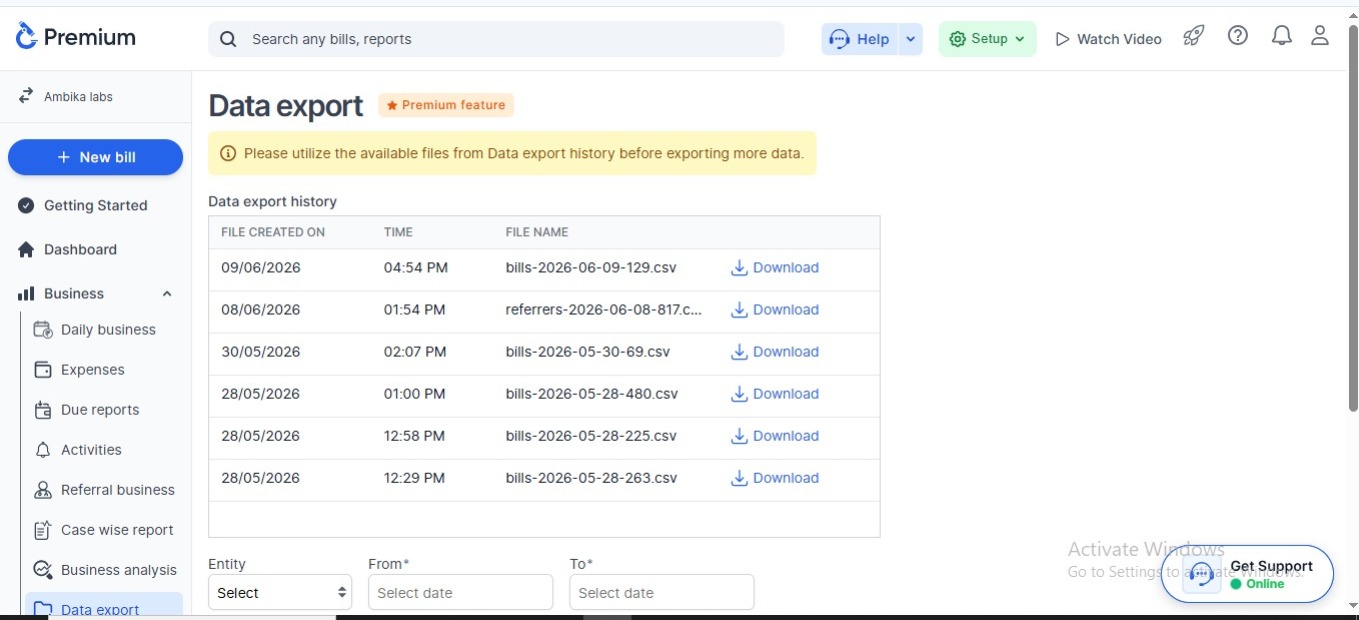
Your lab data is very important. Every patient record, bill, report, and payment detail helps you run your lab better.
With the Data Export feature in Labsmart, you can quickly download your data anytime in CSV format and use it wherever you want.
You can export and share:
-
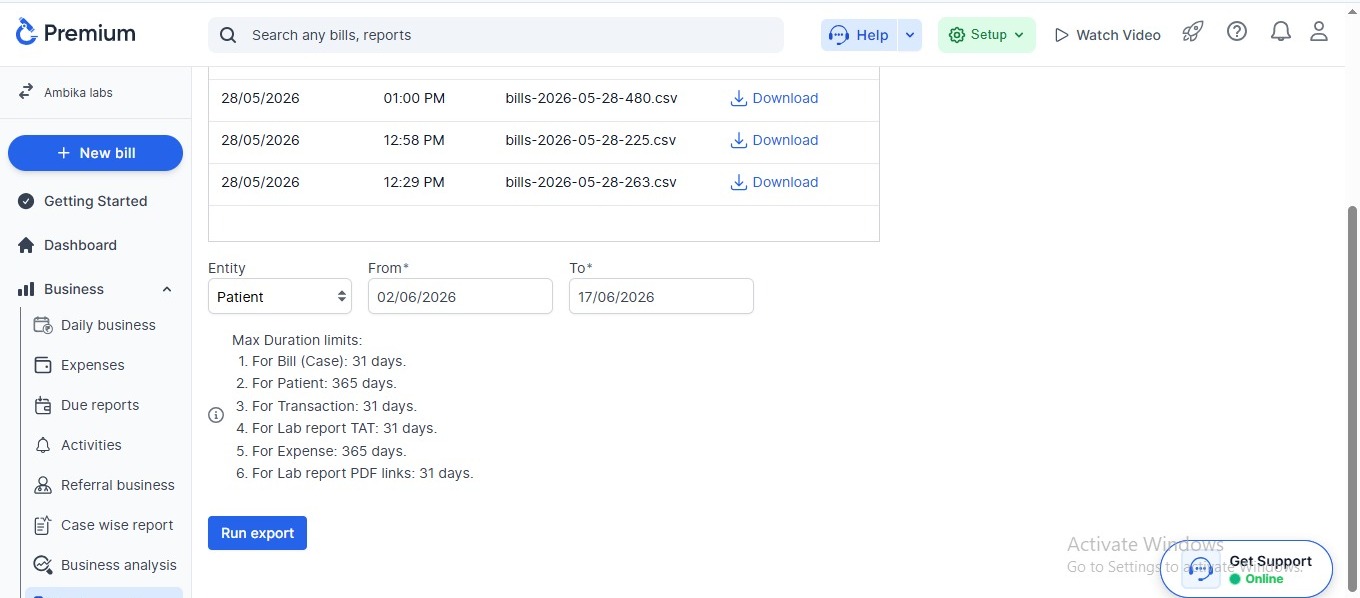
1Bill (Case) Data – Last 31 Days
-
2Patient Data – Last 365 Days
-
3Transaction Data – Last 31 Days
-
4Lab Report TAT Data – Last 31 Days
-
5Expense Data – Last 365 Days
-
6Lab Report PDF Links – Last 31 Days
The exported file can be easily opened in Excel or shared with your team.
Why Data Export is Important for Labs
Many labs need their data for different reasons like:
- Creating SMS campaigns
- Calling old patients for health checkups
- Running promotional offers
- Managing accounts and reports
- Sharing records with accountants or management
- Keeping backup of important data
- Analyzing lab growth and patient history
With Labsmart, you do not need to manually copy data one by one. Everything can be exported in just a few clicks.
Export Data in CSV Format
The software allows you to download data in CSV format.
CSV files are simple and easy to use:
You can:
-
Open in Microsoft Excel .
-
Easy to filter and sort data.
-
Simple to share on email or WhatsApp.
-
Useful for reports and analysis.
What Can You Export?
Bill (Case) Data - Last 31 Days
Export billing and case-related information from the past 31 days. This includes patient bills, test details, discounts, and payment status.
Patient Data - Last 365 Days
Export patient information from the past 365 days. This includes patient details like name, address, contact number etc.
Transaction Data - Last 31 Days
Export transaction records from the past 31 days. This includes cash payments, online payments, pending amounts, and other financial transactions.
Lab Report TAT Data - Last 31 Days
Export Turnaround Time (TAT) reports for the last 31 days to monitor how quickly reports are being processed and delivered to patients.
Expense Data - Last 365 Days
Download expense records from the last 365 days. This helps track laboratory expenses, operational costs, vendor payments, and other business expenditures.
Lab Report PDF Links – Last 31 Days
Download PDF report links generated within the last 31 days. These links can be used to quickly access, share, or manage patient reports whenever needed.
Benefits of Lab Report QR Code
Using reports QR coded gives many benefits to labs and patients.
Fast and easy data download
Minimum technical knowledge needed
Export large amount of data in seconds
Safe and organized records
Helps in marketing and patient follow-up
Easy backup for your lab
Better management and reporting
Time Saving
Who Can Use This Feature?
This feature is useful for:
-
Pathology labs
-
Hospital laboratories
-
Diagnostic centers
-
Lab owners and managers
-
Accounts teams
-
Marketing teams
Why Choose Labsmart for Data Management?
Labsmart helps labs manage and organize all their important information in one place.
The software is simple, fast, and made specially for pathology labs and diagnostic centers.
With smart data export options, labs can easily access their information whenever needed.
Get Complete Control of Your Lab Data
with Labsmart Today
Features
Basic
Easy & Accurate Reporting
Start your 5 days free trial with Labsmart.