





Top 5 Billing Software for Pathology Labs in India (2026)
By Gaurav Singh Adhikari · Reviewed by Abhishek Srivastava and Saubhik Bhaumik · Updated · 10 min read
What is pathology lab billing software?
Pathology lab billing software is a digital tool that helps diagnostic labs prepare patient bills, calculate test charges, manage payments, and track pending amounts. Instead of checking a printed rate list, calculating totals, and writing bills by hand, staff can select the required tests, apply discounts, record payments, and generate bills in minutes. The software can also record payment methods such as cash, UPI, and cards, making daily billing and accounting easier.
Good pathology lab billing software does more than create bills. It helps labs maintain correct patient details, manage test prices through editable rate lists, record partial payments and pending balances, and track billing activity. Features such as automatic calculations, age and gender checks, and a history of bill changes can reduce manual errors and make staff activity easier to track. Depending on the software, labs may also be able to share digital bills through WhatsApp, send payment reminders, and print bills using thermal printers.
Why billing softwares are important?
Imagine a busy Monday morning. Ten patients are waiting in line, and each needs a different set of tests. The receptionist checks a printed rate list, uses a calculator, and prepares each bill by hand. The queue keeps growing, so she starts rushing. One patient gets the wrong price, and another gets the same discount twice.
By evening, the lab has lost money on one bill and upset a patient with another. Billing software removes most of these manual steps. Test prices are saved, totals are calculated automatically, and bills can be printed in seconds.
If your lab still uses a printed rate list and a calculator for billing, it may be losing time and money every day. Staff can make small mistakes, queues grow longer, and by the end of the day, it may be difficult to know exactly how much money the lab collected.
Billing software can help solve these problems. For this guide, we reviewed more than 15 pathology lab software options available in the market. We watched demo videos to understand their billing features and checked the pricing pages and public listings of the shortlisted tools. We compared them on five points: billing features, ease of use for counter staff, transparent pricing, suitability for Indian labs, and customer support, including whether a free trial or demo is available. Based on this review, we selected five options for our final list: Labsmart, Health Amaze, Qmarksoft, Drlogy, and CrelioHealth. For each option, we explain its main billing features, price, and the type of lab it may suit.
Short answer: If you run a small or medium-sized lab and want quick billing at an affordable price, we recommend Labsmart based on customer reviews on Google and feature parity.
Top 5 billing software for pathology labs at a glance
| Software | Best for | Google Reviews | Starting price | Free trial or demo |
|---|---|---|---|---|
| Labsmart | Small to large labs, including multicentre labs and labs with multiple collection centres. | 4.9 stars across 692 Google reviews. (Highest number of Google reviews in the market) |
₹4,999 + GST per year | 5-day free trial, Free demo, Free guided onboarding |
| Health Amaze | Smaller labs | 4.8 stars across 261 Google reviews | ₹5,999 + GST per year | Free trial |
| Qmarksoft | Small to medium-sized labs or B2B Labs | 4.7 stars across 125 Google reviews | ₹9000 +GST per year | Free demo |
| Drlogy | B2B labs | 4.9 stars across 358 Google reviews | Price available on request | Free demo |
| CrelioHealth | Enterprise labs | 4.1 stars across 214 Google reviews | ₹96,000 per year + GST | Demo; free trial on request only |
We ranked these tools based on how well they suit a typical small or medium-sized Indian lab. We considered billing features, clear pricing, the availability of a free trial, and ease of use.
Manual billing vs software billing
Many labs begin with paper-based billing. It may work when only a few patients visit each day, but it becomes harder to manage as the lab grows. Here is how manual billing compares with billing software.
| Task | Manual billing | Billing software |
|---|---|---|
| Rate list | Staff must remember prices or look them up in a printed rate list. Searching takes time, and reading the wrong line or making a small mistake gives a wrong bill. | All prices are saved in the software. Staff pick the test, and the software picks up the right price automatically, so nobody has to remember or copy prices. |
| Calculation | Total, discount and balance are done by hand. Mistakes happen, especially in a rush. | Total, discount and balance are calculated automatically. |
| Insurance | Insurance companies need digital bills. A hand-written bill is often not accepted. | The bill is digital and can be shared as a PDF. Insurance can be recorded as a payment type. |
| Different rate lists | Labs often charge different rates to walk-in patients (B2C) and patients referred by some doctors or B2B cases. Keeping two or more printed price lists is confusing, and staff can pick the wrong one. | You can add more rate list entries and choose the one you want for each bill. |
| Home collection | It is very difficult to give bills during home collection, because the phlebotomist cannot carry bill books everywhere. | The phlebotomist makes the bill on a mobile phone at the patient's house. The patient gets the bill on WhatsApp or as a PDF. This creates transparency with the patient and helps the lab to gain trust of the patient. |
| Age and gender validation |
A test meant for females, by mistake can be billed to a male patient, and the other way round. This creates a horrible impression of the lab and is a serious mistake. If staff forget to ask for age or gender, or write them incorrectly, it can cause an issue in the report, because normal values depend on them. |
Sex and age are required fields, so staff cannot skip them. If a test meant only for women, such as a pregnancy test, is added for a male patient, it shows an alert and does not generate the bill. This reduces the chance of making serious mistakes. |
| Daily revenue (hisab kitab) | At closing time, staff adds up all the bill slips to do the daily hisab kitab (accounting). It takes time, and one missed slip makes the calculation wrong. | The day's collection and accounts are ready in the software. No manual calculation is required at the end of the day. |
| Cash, UPI, card | Staff has to manually calculate payments received by cash, UPI and card. Noting all transactions in registration book manually and calculating them at eod, increases the chance of mistakes. | Each bill records how the patient paid, so you see totals for cash, UPI and card in the software. |
| Counters and cashiers | With more than one counter or cashier, it is hard to know who collected how much. Accounting becomes difficult. | Each bill is linked to the staff member who made it. Cashier-wise reports show each person's business and daily collection, making it easier for the owner to do accounting. |
| Due bills | Dues are written in a notebook and can be forgotten. | Every bill shows the paid amount and the balance, and you can filter all bills that have a due. |
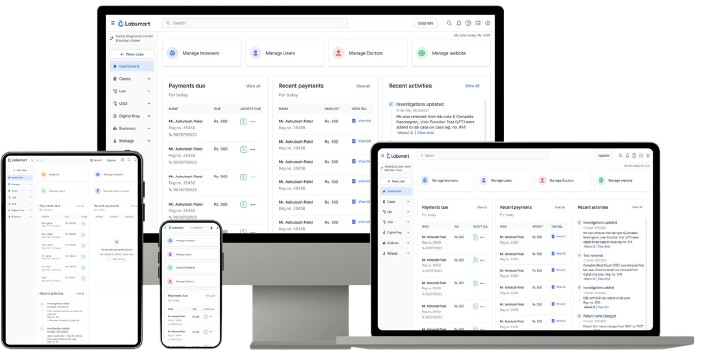
Setup & start billing
In just
5 minutes

7 features to look for in billing software
Use this checklist when comparing different software options.
| Number | Feature | Why it matters |
|---|---|---|
| 1 | Thermal printing | Thermal printers print small bills fast and cost less than A4 printing. |
| 2 | Rate list management | Prices change. You should be able to edit them yourself and use different rate lists for B2B, B2C, and patients referred by certain doctors if required. The majority of labs are B2C labs that bill on a single rate list. So, this might not be required for you if that is the case. |
| 3 | Ease of use | The software should not be complicated and difficult to use. Mostly, people who work as receptionists in small individual labs are not that tech-savvy. Counter staff should be able to learn quickly. |
| 4 | Packages | Health checkup packages bundle many tests at one price. It's important that the software should allow us to manage packages and manage pricing for those packages as well. |
| 5 | Phlebotomist fee | Home collection often has a collection charge. The bill should show it clearly. But most importantly, the lab owner should know how much collection charge to pay and to whom, without drowning in records. |
| 6 | Business summaries | As a lab owner, it's very important to understand how much business my lab has done at the end of the day to do accounting i.e, hisab kitab, properly. Apart from that, the lab owner should be able to know how much revenue the business generated monthly. The ease of understanding business and doing accounting is a very important part. |
| 7 | Referral business | Again, very importantly, the lab owner should be able to understand which doctor has sent how many patients and what business the lab has received from each referring doctor. |
The 5 billing software reviewed
We ranked these tools based on how well they suit a typical small or medium-sized Indian lab, considering billing features, clear pricing, free trials, and ease of use. Labsmart is our product, so we have listed it first while also being clear about its limitations.
1. Labsmart
- Best for: Small to large labs, including multi-centre labs and labs with multiple collection centres.
- Google reviews: 4.9 stars across 692 reviews.
- Customer testimonial videos: Browse Labsmart's YouTube playlists for customer testimonials
- Starting price: ₹4,999 + GST per year.
- Free trial or demo: 5-day free trial, free demo, and free guided onboarding.
Labsmart is a cloud-based pathology lab management software used by over 3,000 labs, with more than 2 crore lab reports printed and delivered online through the platform. It brings together essential laboratory operations, including patient registration and billing, laboratory reporting, accounting, and referral business management, helping diagnostic centres manage their day-to-day operations through a single system.
Billing features
- Patient registration and billing: Staff can register a patient, add tests, calculate the total, apply a discount and record payment. Digital bills can be shared over WhatsApp. Read more: Patient registration and billing
- Rate lists: Manage all your rate lists in the software, with every test and its price saved in one place. Staff don't need to remember any prices while billing: Labsmart picks up the right rate and does the calculation.
- Packages: Health checkup packages such as a full body checkup, pregnancy profile or pre-surgical profile are often the tests your patients buy most. With Labsmart, you set up each package once, with its tests and its own price, which can be lower than the tests cost separately. At the billing counter, staff select the package and Labsmart adds every test in it to the bill and the report, charged at the package price. Nobody has to remember which tests a package includes, nothing gets missed, and you can create or change packages whenever you launch a new offer.
- Different departments on one bill: Add lab tests, USG, X-ray, digital X-ray, CT scan, MRI, ECG, EEG, mammography and outsourced tests to the same bill.
- Discounts with a reason: Every discount is recorded with its type and the reason it was given. Later, owners can go back and see exactly which patients got a discount and why, so discounts stay under control instead of quietly eating into revenue.
- Barcode: Bills have a unique barcode and QR code. Staff can track samples by barcode, which is basically an auto-generated unique registration number / bill no. for each bill.
- Home collection billing: Your phlebotomist can open Labsmart on their mobile phone and bill the patient on the spot, right at the patient's home. The digital bill can be shared with the patient straight away, so they know exactly what they paid for. That transparency builds trust in your lab from the very first visit. Read more: Home sample collection
- Due bills: The Due Summary shows every bill with a pending amount and exactly how much is still due. Pick a date range to check dues for any period and follow up with patients on time, so no due amount is ever forgotten and money owed to your lab actually gets collected.
- Activity tracking: Every change made to a bill is recorded, along with who made it and when. Owners can review the edit history of any bill at a glance, which discourages unauthorised changes and keeps your billing honest. Read more in Activity tracking
- Printing and bill design: Add your lab’s logo, name and address. Print on A4 or A5 paper using laser or inkjet printers, or use a thermal printer with 3-inch paper. Search for patients by name, phone number or case ID and view their history.
- Billing-only plans: Labs that only need billing can choose plans at ₹3,999, ₹5,999 or ₹7,999 per year + GST. These cost 20% less than the corresponding plans with the lab reporting module. Contact Labsmart support to set one up.
Pros
- Designed to be quick to learn, with billing possible in about five minutes.
- Pricing is shown openly, and billing-only plans are available.
- Free support, a 5-day free trial and a 7-day money-back guarantee.
- Billing, samples and reports are linked through one case registration number.
Cons
- Enterprise labs may need additional features.
- The software is extremely optimized for B2C Labs but B2B labs may need some extra features.
Price: Starts at ₹4,999 + GST per year (about ₹417 per month). Billing-only plans are available at ₹3,999, ₹5,999 and ₹7,999 per year + GST.
Consider Labsmart if: You want transparent pricing, a short learning curve, and reliable software and support. As labsmart supports small to large labs, you don’t need to switch software as your lab grows. It is also worth considering if you need different rate lists or want a billing-only plan. Start your free trial
2. Health Amaze
- Best for: Smaller labs.
- Google reviews: 4.8 stars across 261 reviews.
- Customer testimonial videos: No dedicated video was found
- Starting price: ₹5,999 + GST per year.
- Free trial or demo: Free trial.
Health Amaze is a cloud-based pathology lab software company based in Bengaluru. It has been in the market since 2015.
Billing features
- Barcode on bills and QR code on reports.
- Digital signatures, custom letterheads, and automatic bill and report numbering.
- More than 250 lab tests, along with the option to add custom tests.
- The Standard plan includes four staff logins, doctor and referral reports, permission controls and an activity tracker.
- The Advanced plan adds a collection centre portal, collection centre rate lists and pay-later tracking.
- Monthly WhatsApp and SMS credits: 100 on Basic, and 500 on Standard and Advanced.
Pros
- Pricing is shown openly.
- A 7-day money-back guarantee is available.
- Support is good as mentioned in reviews.
Cons
- Staff logins and doctor reports start from the Standard plan, rather than Basic.
- We did not find a billing-only plan in the pricing information reviewed.
Price: Starts at ₹5,999 + GST per year. The listed yearly prices were ₹5,999 for Basic, ₹7,499 for Standard and ₹9,999 for Advanced, all plus GST. The monthly equivalents shown on the pricing page were ₹499, ₹625 and ₹833, respectively. These prices were shown on 27 October 2026.
Consider Health Amaze if: You run a smaller lab and want cloud-based billing with QR-code reports, custom letterheads, and staff controls on higher plans.
3. Qmarksoft
- Best for: Large or B2B labs.
- Google reviews: 4.7 stars across 125 reviews.
- Starting price: ₹9,000 + GST per year
- Free trial or demo: Free demo.
Qmarksoft provides software for pathology labs, clinics and hospitals. It lists several deployment options, including an offline version with a one-time licence, locally hosted and cloud-hosted servers, and an online plan billed monthly.
Billing features
- Pathology reporting and billing, including radiology billing.
- Barcode and QR-code reports, digital signature and logo, and custom letterhead.
- Multiple rate slabs.
- Doctor referral and agent management.
- Sample, collection-centre and outsourced-test management.
- Test packages, expense management and user access rights.
Pros
- Pricing information is published for different options.
- The offline version can work without an internet connection
- B2B compatible features can help B2B labs to manage better
Cons
- The number of plan and hosting options can make it harder to decide which one to choose.
- The smallest online plans have patient limits of 250 or 500 patients a month.
- GST is extra. SMS and WhatsApp are billed separately, and machine interfacing is charged per analyser.
- Extra computers for the offline version cost ₹2,500 to ₹3,000 each. We did not find a billing-only plan in the information reviewed.
- User experience is complicated, as we have heard from customers who migrated from Qmarksoft to Labsmart. This might vary from user to user.
Price: Starting price of ₹9,000 + GST per year. Qmarksoft also lists offline, hosted-server and online options with different billing arrangements. Confirm the current price for the version that suits your lab before buying.
Consider Qmarksoft if: You want to compare offline and online deployment.
4. Drlogy
- Best for: B2B labs.
- Google reviews: 4.9 stars across 358 reviews.
- Starting price: Pricing is available on request. No Open and transparent pricing.
- Free trial or demo: Free demo.
Drlogy offers lab software with a broad set of features. Its Premium plan includes QR-code patient registration, test, panel and package management, expense management, a reference doctors portal, a patient portal, outsource management, and MIS reports.
Pros
- A wide range of modules, including insurance and TPA management, expense management and patient and doctor portals.
Cons
- The Premium price is not listed; the website asks users to contact the company for a demo and pricing.
- The free plan covers online listings and appointments, not full billing.
- Labs that need only basic billing may not need every module included in the Premium plan.
- We did not find a billing-only plan in the information reviewed.
Price: The free plan covers online listings and appointments. Premium pricing is available on request.
Consider Drlogy if: You want to explore billing alongside a wider set of lab-management tools, and you are comfortable contacting the provider to get a quote.
5. CrelioHealth: best for enterprise labs
- Best for: Enterprise labs.
- Google reviews: 4.1 stars across 214 reviews.
- Starting price: ₹96,000 per year + GST.
- Free trial or demo: Demo, plus a free trial on request. There is no open free trial, so you can't sign up and try it yourself; you have to contact the company first.
CrelioHealth is a cloud-based laboratory information system used by more than 2,500 labs worldwide, including labs in India and the US. It is built mainly for larger diagnostic businesses and multi-location lab chains, covering patient registration, billing, reporting and finance management, with tools for running several branches from one system. Its data for Indian labs is hosted on cloud servers in India.
Billing features
- Order and payment management, with online payments through Razorpay.
- Finance and MIS reports, along with a finance dashboard.
- Sample barcoding.
- The Advanced plan adds branch management, cross-location transfers, a more detailed finance dashboard and a home-collection module with GPS tracking.
- The Standard plan includes 2,000 automated SMS credits per month.
Pros
- Offers tools for multi-branch operations and B2B customers.
- Includes finance reporting.
- Publishes prices for its Standard, Advanced and Premium plans.
Cons
- It costs more than the other options listed here.
- Home-collection tracking starts with the Advanced plan.
- Extra logins, integrations and data migration cost extra.
- We did not find a billing-only plan in the information reviewed.
Price: The Standard plan starts at ₹8,000 per month, or ₹96,000 per year, plus 18% GST. Advanced and Premium are listed at ₹15,000 and ₹25,000 per month + 18% GST, respectively. Onboarding fees are ₹10,000, ₹20,000 and ₹50,000 for Standard, Advanced and Premium. Enterprise pricing is available on request.
Consider CrelioHealth if: You operate a large or multi-centre lab with patient volume of more than 2000+ per month and need branch management, cross-location transfers and more advanced finance reporting.
Sahi Reports Har baar
Start your 5 days free trial with Labsmart.
How to choose billing software by lab size
The right billing software depends on the size of your lab and the type of work you do.
- Small to medium-sized labs: Choose software that is affordable, easy to use, and comes with good support. Labsmart and Health Amaze are good options to consider. Labsmart also offers billing-only plans for labs that do not need all the features of the full software.
- Medium to large labs: As your lab grows, you may need features like doctor-wise reports, data export, and multiple staff logins to manage multiple billing desk. Labsmart and CrelioHealth are worth considering. Labsmart allows multiple cashiers to use their own logins, making it easier to manage billing when several staff members work at different counters.
- Enterprise labs and diagnostic chains: If you run a large lab, a hospital lab, or a chain with many branches, look for software that helps you manage billing and finances across locations. CrelioHealth is worth considering for these needs.
- B2B labs: If your lab processes samples for other labs, you need software that can manage B2B billing, customer accounts, and pending payments. Qmarksoft, CrelioHealth, and Drlogy are options to explore. Before choosing, ask each provider to show you how its software handles B2B billing and payment tracking.
10 questions to ask before you buy
Use these questions during every software demo.
- Can I keep separate rate lists for B2B, B2C and doctors?
- Can I manage packages and package wise prices?
- Can I add a collection charge for home collection?
- How easy is it to complete end-of-day accounting using the software?
- Is GST included in the price?
- Are SMS and WhatsApp charges extra?
- Is there a limit on the number of bills?
- Can I print on a thermal printer?
- Can I see all due bills in one list?
- Can I export my data?
- How reliable is the software? What is the review of other customers?
- Is support free, and how can I reach it?
- Can I try it before I pay?
Frequently asked questions
It depends on your lab size. For small and medium-sized labs, Labsmart is quick to learn and has open pricing. For large multi-centre labs, CrelioHealth is built for that scale.
Labsmart starts at ₹4,999 + GST per year. Health Amaze starts at ₹5,999 + GST per year. Qmarksoft sells an offline license from ₹8,500 one time and online plans from ₹750 per month. CrelioHealth starts at ₹8,000 per month + 18% GST. Drlogy shows its Premium price on request.
With Labsmart, yes. It supports thermal printers with 3-inch paper, and also A4 and A5 on laser and inkjet printers.
With Labsmart, yes. Your phlebotomist can open Labsmart on their mobile phone, bill the patient at their home and share the digital bill with them straight away, so the patient knows exactly what they paid for.
Software gives you a digital bill, which insurance companies ask for. Labsmart lets you record insurance as a payment type. See the Mediclaim and TPA page.
Yes. In Labsmart, the Due Summary shows every bill with a pending amount and how much is still due. You can pick a date range to check dues for any period, so no due amount is forgotten.
Yes, in Labsmart. You can add more than one entry for the same test in a single rate list, each with its own price. For example, if you bill CBC at two different rates, create two CBC entries in the rate list. While billing, staff select the entry that suits the patient, and Labsmart calculates the bill at that rate.
Running B2B billing well takes more than separate rates. You also need to manage payments and dues from each B2B client. Labsmart is currently working on these B2B payment features. Until then, multiple entries in the same rate list let you bill B2B clients at their own rates.
Labsmart is built for beginners, and billing can start in about 5 minutes.
Labsmart gives a 5-day free trial and a 7-day money-back guarantee.
Labsmart has billing-only plans that cost 20% less. Contact Labsmart support to set one up.
Why you can trust this guide
- Built by people who know labs. Labsmart's founder, Abhishek, owns 25+ laboratories and grew up in a family of laboratory owners. He saw the shortcomings of manual billing and lab management and started Labsmart to provide small and medium-sized labs with a quality software to manage their business better.
- Talked to thousands of labs. Labsmart's team has spoken with 15,000+ lab owners who wanted to digitise their lab. 3,000+ labs use Labsmart every day, and as a result we understand where most of the lab owners face day-to-day issues.
- Lab-trained support team. The Labsmart support team includes people with MSc MLT, BSc MLT, and DMLT qualifications who has 2+ year of experience working in a lab. This guide and the software mentioned was reviewed by them as well, so that we can provide a list that address lab owners' actual problems in a simple manner.
- How we checked the tools. We checked Labsmart's own billing software. For the other four tools, we read their pricing pages and public listings and watched available videos. We did not test those products ourselves.
- Prices change. Please confirm the price on each company's website before you buy.
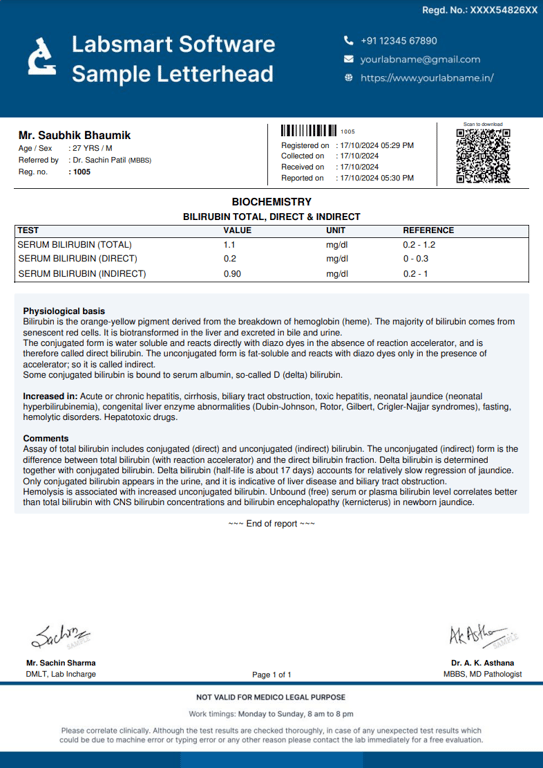
beautifully designed Lab reports
Try Labsmart & start customizing your reports